Enso · a free help centre theme for Zendesk®
Enso accessibility notes
How Enso is tested, the known issues and the 15 colour pairs to check when you choose your own colours.
With its default colours, Enso is tested with axe-core against the WCAG 2.2 A and AA rules on 2,137 page loads, at 8 screen widths, in light and dark mode. Scripted checks cover keyboard focus, reflow at 320 px and text spacing. IBM Equal Access, Siteimprove Alfa and HTML_CodeSniffer cross-check each release. The colours you choose can lower contrast: the theme editor preview flags pairs that fall below AA, and the settings guide lists every pair to check.
How Enso is tested
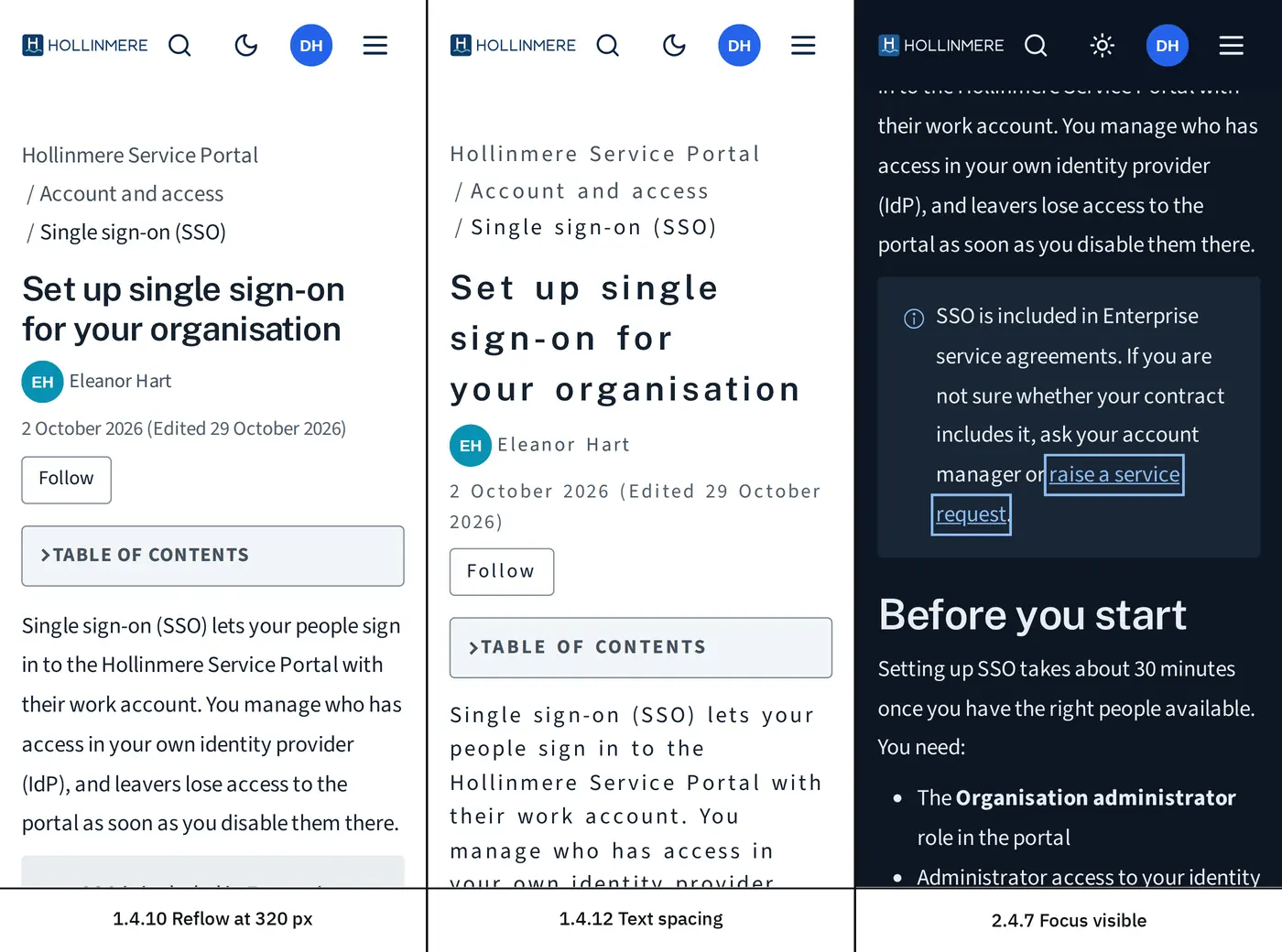
Every release runs 24 build guards, 195 unit tests, 50 visual baselines and 2,137 page loads at 8 screen widths, in light and dark mode. The three checks below are part of it. There has been no manual audit and no screen-reader audit, so these notes make no claim of conformance.
01
axe-core on every page and setting
Each page loads at 8 screen widths in light and dark mode: with the defaults, with each setting changed on its own, and with a pairwise set of layout settings. axe-core checks every load against the WCAG 2.2 A and AA rules. When axe cannot judge the contrast of very short text, such as a count, the test measures it directly. The findings axe still reports are listed under known issues.
02
Scripted checks
A script presses Tab through each page and checks that every stop shows a focus indicator (WCAG 2.4.7) and keeps its text at 4.5:1 or more. One of the 8 screen widths is 320 px, where the test fails any page that scrolls sideways (WCAG 1.4.10 reflow). Pages are also loaded with WCAG 1.4.12 text spacing applied.
03
Three-engine cross-check
IBM Equal Access, Siteimprove Alfa and HTML_CodeSniffer check the three fictional showcase brands on each release, in light and dark mode. Contrast findings are measured again from the rendered colours. Every A or AA finding must be fixed or listed with a reason, or the run fails. This check was added after these engines found two failures that axe had missed.
Known issues
The first three are in markup that the Zendesk modules render. Enso mounts those modules unmodified, so it cannot fix their markup at the source; they are listed here so you know about them before an audit. The fourth is in Enso and appears only in conversational mode.
- Service catalogue sidebar
- Controls sit inside an element with role=button. The sidebar is an aside landmark with no label. The module also adds a second main landmark inside the main landmark of the page.
- New request form
- One field label points at an input id that the component never renders. The rich-text editor (CKEditor) has no accessible name on its application region.
- "My requests" list
- The tabs repeat an id. IBM Equal Access and Siteimprove Alfa flag the table structure and the sortable column-header buttons. Enso removes the tabs' broken aria-controls links itself.
- Sticky composer bar in conversational mode
- In chat and hybrid modes, content pages show a composer bar fixed to the bottom of the screen. While the page is at rest, it can cover the last links on screen. A link that receives keyboard focus scrolls clear of it. Conversational mode is off by default.
Colour pairs to check
At the default colours, every pair below meets its WCAG 2.2 AA minimum in light and dark mode. Brand colours can lower contrast, so check all 15 pairs in both modes when you set colours. Light pairs use the Light Mode Colours, Header and Footer settings; dark pairs use the Dark mode group and the dark header and footer settings. The contrast check in the theme editor preview tests the same 15 pairs and names the settings to change. Visitors never see it. The list does not cover hero text on the hero colour or image, or the accent, success and warning colours: check those with a contrast tool when you change them.
| Where the pair appears | Settings | Minimum |
|---|---|---|
| Body text on the page background | Text (primary) on Background (primary) | 4.5:1 |
| Text on cards and panels | Text (primary) on Background (secondary) | 4.5:1 |
| Text on tinted blocks | Text (primary) on Background (tertiary) | 4.5:1 |
| Secondary text on the page background | Text (secondary) on Background (primary) | 4.5:1 |
| Secondary text on cards | Text (secondary) on Background (secondary) | 4.5:1 |
| Muted text (dates, counts) on the page background | Muted text colour on Background (primary) | 4.5:1 |
| Muted text on cards (for example the contents heading) | Muted text colour on Background (secondary) | 4.5:1 |
| Links on the page background | Link colour on Background (primary) | 4.5:1 |
| Links on cards | Link colour on Background (secondary) | 4.5:1 |
| Link text on hover and focus | Primary colour on Background (primary) | 4.5:1 |
| Button text on primary buttons | Text (inverse) on Primary colour | 4.5:1 |
| Error messages | Error colour on Background (primary) | 4.5:1 |
| Header links | Header: Text colour on Header: Background colour | 4.5:1 |
| Footer text | Footer: Text colour on Footer: Background colour | 4.5:1 |
| Footer links | Footer: Link colour on Footer: Background colour | 4.5:1 |
Report a barrier
If something on a help centre that runs Enso stops you or a visitor from using it, email [email protected] with the page address and what happened. Say which browser and assistive technology you used, if any.
Free, with help when you need it
The theme is free under the Zendesk Marketplace standard licence. When you need changes beyond settings, or a faster answer, Kanso offers custom builds and paid support.
Install from the Zendesk Marketplace
Free, with a standard licence. Marketplace themes need Guide Professional or above (Zendesk shows this on every listing).
Marketplace listing coming soon
Try a demo help centre
Each demo help centre runs one fictional brand on Enso, set up through settings alone. Click through the pages before you install anything.
Open a demo help centreCustom builds
For changes beyond the 197 settings, Kanso builds a custom version at a fixed scope and price. A custom build stops getting Marketplace updates, so Kanso offers maintenance with it.
About custom buildsSupport
Free: the settings guide and FAQ (being written) and bug reports by email, answered on a best-effort basis. Paid: configuration help, with the response time and price in your quote.
Support optionsZendesk is a trademark of Zendesk, Inc. Kanso CX Ltd is an independent company, not part of Zendesk, Inc., and Zendesk does not provide or support Enso. Wrenfold, Velquin and Hollinmere are fictional brands made to show Enso; any resemblance to real companies is unintended.